7 CTR Campaign Mistakes to Avoid With Automated Search Traffic
You are paying for search visits you cannot verify. Without screenshot proof, a campaign can look active while clicks never land on the keyword you targeted, and credits drain on traffic nobody can audit.
This article walks through seven CTR campaign mistakes, from ignoring keyword position eligibility to mixing desktop and mobile carelessly. By the end, you will know how to test a campaign before spending on credits, track keyword positions over time, and judge whether CTRTool fits your workflow.
What Is CTRTool and How Does Its Automated Search Traffic Work?
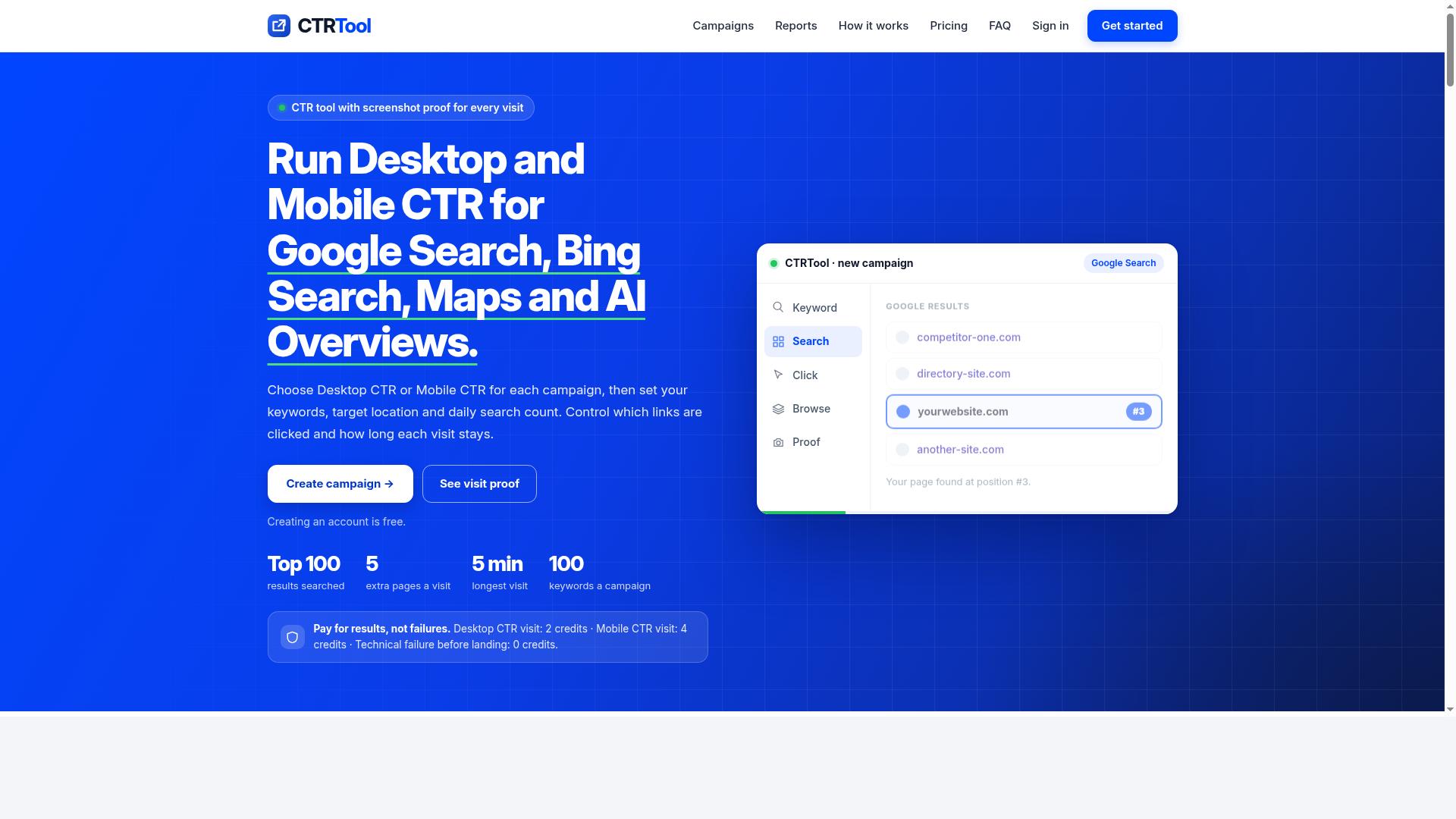
CTRTool is a SaaS platform that runs click-through rate (CTR) campaigns by simulating organic search visits to improve keyword rankings and visibility. It serves SEO professionals and site owners who want measurable search activity rather than guesswork.
The core idea is simple. Real users perform searches, find the target result, and click through, while the platform captures screenshot proof for every visit. That proof matters because it lets you verify each search and landing event instead of trusting a dashboard number.
CTRTool covers Google Search, Bing Search, Maps and AI Overviews. Each campaign type follows the same principle: a search happens, a result is clicked, and the visit is documented from start to finish.
The platform is transparent about limits. Its own site states: Automated visits do not guarantee rankings. That honesty is worth keeping in mind as you read the seven campaign mistakes below, because most of them come from expecting automation to replace sound keyword targeting and search intent matching.
Understanding what the tool actually does, and what it does not promise, is the first step toward running campaigns that hold up over time.
Campaign Types, Targeting and Screenshot Proof
CTRTool offers distinct campaign types, Google Search CTR, Bing Search CTR, Google Maps CTR, and AI Overview CTR, each with specific targeting options and verification. Choosing the right type for your goal is where many campaign mistakes begin.
Here is how the four types differ:
- Google Search CTR: a user searches your keyword and clicks the organic result. Works on Desktop or Mobile, reaches the Top 100 results, and can point to internal pages.
- Bing Search CTR: the same search and click flow, applied to Bing.
- Google Maps CTR: a user finds your business listing among up to 50 listings and clicks its website link, with city targeting.
- AI Overview CTR: a user finds your website in the overview and clicks its source link, which requires matching on source links and citation order.
Targeting is flexible. You pick a country and optionally a state or city, or choose Any country for broader reach. You also set daily search counts and choose Desktop or Mobile per campaign, so mobile CTR and desktop CTR stay separate.
Proof is the backbone of the reporting. Every visit produces search and landing screenshots as separate proof images, plus full visit paths that show how the session unfolded. Reports also track keyword positions over time, including Search positions, Maps listing order and AI citation order.
Delivery runs through Desktop Chrome windows and real Android phone sessions matched to your target location via managed proxy routes. With up to 100 keywords per campaign and search depth up to 100, the setup supports focused keyword targeting rather than scattered clicks.
Mistake 1: Running Campaigns Without Verified Visits
Running CTR campaigns without verified visits means you cannot confirm that clicks actually occurred or that they followed the intended path, wasting budget on unproven activity. Verification is the difference between a campaign you can audit and a report you simply have to trust.
Without proof, you cannot separate real visits from bot traffic, misfires, or simple reporting errors. That gap matters because unverified clicks are unaccountable clicks. If a provider reports activity but shows no evidence, there is no way to check whether the work was done at all.
The same problem applies to campaign performance as a whole. You cannot judge which keywords, locations, or landing pages are pulling their weight if the underlying visits are never confirmed. Every optimization decision depends on clean data, and unverified traffic gives you nothing solid to optimize against.
Several common pitfalls make this mistake easy to fall into:
- Relying on vague analytics. Summary dashboards show totals but hide the path each visit took.
- Trusting providers that show no evidence. A number in a report is not the same as a record of the visit.
- Skipping keyword and location checks. A visit that does not match your target keyword or geography does not help your CTR campaign.
- Never auditing the visit path. Without the full route, you cannot tell whether the visitor reached the intended page.
The practical fix is to require evidence for every single visit. Ask for a search screenshot showing the query and the SERP snippet as it appeared, plus a landing screenshot confirming the visitor arrived on the right page. Full visit paths add the final layer, showing how the session progressed from search to landing page.
Consider a simple example. A campaign reports 500 clicks but supplies no screenshots and no visit paths. Nothing in that report can be validated. You might be paying for phantom visits that never happened, or for visits that landed on the wrong page with no relevance to your keyword targeting or search intent. Either way, the budget is gone and the data is worthless.
Requiring proof on every visit turns CTR campaigns into something you can actually audit. Screenshots and visit paths let you check keyword targeting, confirm location matching, and spot problems before they drain a budget. That level of accountability is the baseline for any credible automated search traffic campaign.
Mistake 2: Ignoring Keyword Position Eligibility
Ignoring keyword position eligibility leads to campaigns that never trigger because your page isn't ranked high enough to be clicked. CTR campaigns rely on finding your page in the organic results, so if it sits outside the reachable range, the automated traffic has nothing to interact with.
Most CTR tools, including CTRTool, require the target page to appear within the top 100 organic results for the chosen keyword and location. If the page falls outside that range, the system cannot locate it, cannot click it, and the campaign stalls without delivering any benefit.
This is one of the quieter campaign mistakes because nothing visibly breaks. The campaign may show as active, yet no clicks arrive, leaving you to wonder why results never materialize.
Eligibility depends on three factors working together:
- Keyword: the exact phrase the campaign will search for.
- Location: the geographic market where the search is performed.
- Indexing: whether the target page is discoverable by search engines at all.
Before launching anything, confirm all three line up. A page that ranks well in one country may be invisible in another, and an unindexed page will never appear regardless of keyword choice.
Checking eligibility takes only a few minutes and can be done three ways:
- Manual search: search the keyword in the target location and page through the results to find your URL.
- Rank-tracking tools: use a tracker configured for the correct location to confirm your current organic position.
- Index check: verify the page is indexed by searching the exact URL or checking your search console data.
Each method has tradeoffs. Manual searches are quick but easy to misjudge due to personalization, while rank trackers give a cleaner position number but need correct location settings.
A concrete example makes the problem obvious. Suppose your page ranks #150 for a keyword you want to target. No CTR campaign will click it because the page never surfaces within the top 100 results for that term.
The fix is not to force the campaign. Either improve the page's organic rank first through on-page and content work, or choose a different keyword where the page already sits inside the eligible range. Both paths keep the campaign functional.
CTRTool requires the target page to appear within the top 100 organic results for the chosen keyword and location, which protects your budget from being spent on campaigns that could never produce clicks and pushes you toward keywords your page can realistically support.
Treat eligibility as a precondition, not an afterthought. Confirm position and indexing for every keyword before building a campaign, and the rest of your CTR setup has a foundation to stand on.
Mistake 3: Mixing Desktop and Mobile CTR Carelessly
Mixing desktop and mobile CTR carelessly dilutes your campaign's effectiveness because search behavior, click patterns, and conversion rates differ significantly between devices. A campaign that performs well on one device can quietly underperform on the other, and blended reporting hides the problem.
CTRTool lets users choose Desktop CTR or Mobile CTR per campaign. Treating that choice as an afterthought, or running both device types inside one undifferentiated effort, can skew your results and make it hard to tell what is actually working.
Device differences are not cosmetic. Mobile SERPs use different layouts, with tighter snippets and fewer visible results above the fold. That changes how a title tag and meta description get read, and it changes the click-through rate you should expect.
Click behavior varies by device too. Mobile users often scan faster and tap on the first plausible result, while desktop users may compare several listings before clicking. The same SERP snippet can earn very different CTRs in each context.
The landing page must match the device as well. A page built for a wide desktop screen often breaks down on a phone: small tap targets, horizontal scrolling, slow load times. Landing page relevance is part of the quality picture, and a poor mobile experience undermines any CTR gains you chase.
Consider a common failure case. You run a mobile campaign that points to a desktop-optimized landing page. Clicks may arrive, but visitors struggle to navigate, so they leave quickly. The result is a higher bounce rate and a lower conversion rate, which erodes the value of every click you paid for in effort and budget.
The same logic applies in reverse. A mobile-first page shown to desktop visitors can look sparse and unconvincing, weakening trust at the exact moment a user decides whether to stay.
The cleaner approach is to run separate campaigns for desktop and mobile. Each one gets its own device setting, its own snippet testing, and its own performance read. You can compare CTR and conversion rate side by side without one device masking the other.
Alternatively, align your device targeting with what your analytics already show. If most of your converting organic traffic comes from mobile, weight your effort there. If desktop drives the bulk of your conversion rate, protect that channel first.
- Check your analytics for the device split in impressions, clicks, and conversions before choosing a device setting.
- Match each campaign's landing page to the device it targets.
- Review title tag and meta description rendering on both screen sizes.
- Judge results per device, not from a blended total.
Handled this way, the desktop and mobile choice becomes a deliberate part of your campaign setup rather than a source of noise in your data.
Mistake 4: Skipping Location and Daily Search Count Controls
Skipping location and daily search count controls results in campaigns that either over-deliver in irrelevant areas or under-deliver in target markets. Both settings are easy to overlook when you are focused on ad copy, title tags, and keyword targeting, yet they shape the traffic your automated search traffic campaign actually produces.
Location controls decide where a click originates. Without them, your budget spreads across regions you may not serve, and those clicks rarely convert. Daily search count controls decide how many visits arrive each day. Without them, traffic can bunch up into spikes that look unnatural compared with normal organic traffic patterns.
Together, these two settings act as the pacing and geography layer of a CTR campaign. Ignoring either one undermines the work you put into your SERP snippet, meta description, and landing page relevance, because the right visitor may never see the result.
Location targeting lets you aim a campaign at a single country, a narrower region such as a state or city, or a broad mix across any country. The right choice depends entirely on your search intent and service area.
A local business that only serves New York City but forgets to set its location will collect clicks from across the US. Those visitors land on a page promising same-day service in Manhattan, realize it does not apply to them, and leave. The result is a higher bounce rate, a lower conversion rate, and credits spent on people who were never prospects.
- Single market: target one country, and narrow to state or city when your business is local.
- Regional service: target the countries or regions you actually operate in, nothing more.
- Broad mix: use an any-country setting only when your offer genuinely applies everywhere.
The rule is simple: your location setting should mirror your market. If your landing page mentions a city, your clicks should come from that city. If your pricing is in one currency, targeting should reflect the region that currency serves.
Daily search count controls determine how many visits a campaign delivers in a day. They exist because real search traffic does not arrive in one sudden burst. It builds through the morning, peaks in the afternoon, and tapers at night.
When a campaign fires too many clicks too quickly, the pattern stands out. Sudden spikes can look artificial to anyone reviewing analytics, and they can also distort your own CTR and conversion rate readings, making it harder to judge whether your title tag and ad copy are working. Pacing visits across the day produces a curve that resembles natural traffic behavior.
Pacing also protects your budget. A steady daily count lets you spread spend over the campaign period instead of exhausting credits in the first burst. That consistency matters when you want to A/B test two meta descriptions or compare keyword targeting approaches over a meaningful window.
Set location first, because it defines who can ever see your campaign. Match it to your market, then narrow it further if your offer is local. Only reach for the broadest setting when your product or service truly has no geographic limit.
Next, set a daily search count that reflects a believable traffic curve for your niche. Start conservative, review the pattern, and adjust as you learn what your landing page and conversion rate can absorb. Watch bounce rate and conversion rate by region to confirm your targeting is landing in the right places.
Finally, review both settings whenever you change ad copy, keyword targeting, or your landing page. A campaign aimed at a new city needs a matching location update, and a heavier daily count should only follow once your funnel proves it can handle the volume. Treat location and pacing as part of your campaign setup, not an afterthought.
Mistake 5: Forgetting That Maps and AI Overview Campaigns Have Their Own Rules
Forgetting that Maps and AI Overview campaigns have their own rules leads to failed campaigns because these platforms require specific eligibility and targeting. A CTR campaign built for standard search results will not automatically transfer to a Maps listing or an AI Overview citation. Each surface has its own entry conditions, and skipping them wastes budget on impressions that can never convert.
The most common error is assuming one campaign type fits every placement. Teams set up a search campaign, point it at a Maps or AI Overview goal, and expect the same click-through rate and conversion rate they see elsewhere. When the impressions arrive but nothing else does, the problem is usually eligibility, not ad copy.
Two rules matter most when planning automated search traffic across these surfaces:
- Maps campaigns check up to 50 listings, roughly five pages of local results, to find your business. If your listing sits beyond that range, the campaign cannot reach it.
- AI Overview campaigns need a matching source link before a citation is even possible.
A practical example: a Maps campaign fails outright when your business listing falls outside the top 50 local results. No amount of title tag or meta description tuning fixes that. The real fix is improving local SEO first, through a complete profile, accurate categories, and steady review activity, so the listing moves into range before you spend on the campaign.
AI Overviews add a second layer of uncertainty. These summaries select citations based on how well a page matches the query and its context, so a campaign aimed at the wrong keyword or intent will not earn a placement. Reviewing each campaign type's requirements before launch, including listing position for Maps and source link match for AI Overviews, prevents most of these failures.
Treat each surface as a separate channel with its own checklist. Confirm eligibility, verify the listing or keyword match, then launch. That sequence protects your CTR budget and keeps automated search traffic pointed at placements where clicks are actually possible.
Mistake 6: Not Tracking Keyword Positions Over Time
Not tracking keyword positions over time means you cannot measure whether your CTR campaigns are improving rankings or just generating clicks. Clicks alone tell you that people are engaging with your SERP snippet. They do not tell you whether that engagement is shifting your ad position or organic placement in a meaningful way.
When you skip position tracking, you lose the correlation between CTR campaigns and ranking changes. You may see a spike in click-through rate and assume the campaign worked, when in reality a separate algorithm update or a competitor's drop drove the change. Without a baseline, every result becomes guesswork.
Tracking keyword positions over time also covers more than classic organic rankings. It includes Maps listing order and AI citation order, which increasingly shape how users discover a business. A campaign that lifts your Maps position or gets your content cited by an AI answer is a real win, but only if you can see it happen.
Set Up Tracking Before You Launch
The most common reason tracking fails is that it starts too late. Record baseline positions for every targeted keyword before the first campaign goes live. That baseline is the reference point for every comparison you make later.
A simple setup works well:
- Log current organic position, Maps listing order, and AI citation status for each keyword.
- Note the date you launch each campaign and the exact keywords it targets.
- Check positions weekly, ideally on the same day each week.
- Compare movement against campaign activity, not against unrelated site changes.
Weekly monitoring is frequent enough to catch movement without drowning in noise. Daily checks often reflect normal SERP fluctuation rather than real ranking shifts.
A Concrete Example of Why This Matters
Suppose a keyword sits at position #15 before your campaign. After several weeks of consistent CTR activity, it moves to position #8. That is a meaningful jump, and it is exactly the kind of result you want to prove ROI.
But without tracking, you would never know it happened. You might see extra clicks and assume the campaign only drove traffic. Or worse, you might cancel a campaign that was quietly improving rankings because you could not connect the outcome to the effort.
The same logic applies to Maps listings and AI citations. A business that rises in local pack order or starts appearing in AI-generated answers has gained visibility that a click count will never reveal.
Use Position Data to Adjust and Prove ROI
Position tracking is not just a scorecard. It is a feedback loop. If a keyword is climbing steadily, you can keep the campaign running and consider expanding to related terms. If a keyword has not moved after a reasonable window, you can adjust keyword targeting or rewrite the SERP snippet rather than repeating the same approach.
Tracking also gives you the evidence needed to justify spend. Showing a stakeholder that a set of keywords improved from page two to page one, or that a Maps listing moved up in order, is far more persuasive than reporting raw clicks. Position movement is the proof that the campaign changed something real.
CTRTool tracks keyword positions over time, including Maps listing order and AI citation order, so this evidence is captured automatically. That turns a vague sense that "something is working" into a clear record you can act on. Combined with click-through rate data, it closes the loop between what users click and where you actually rank.
Mistake 7: Overspending on Credits Before Testing a Campaign
Overspending on credits before testing a campaign often leads to wasted budget on untested keywords, locations, or devices that may not perform. A large upfront purchase locks money into assumptions you have not validated yet.
A sensible approach is a small test first. Run a limited campaign for a few days, then measure position changes, click-through rate, and conversion rate before committing more budget.
For example, instead of buying 5,000 credits upfront, start with 2,000 credits to test a single keyword and device. Only scale once the early numbers justify it.
How CTRTool's Pay-for-Results Credit Model Prevents Wasted Spend
CTRTool's credit-based pricing ties spend directly to delivered visits, with plans like Starter at $59/month for 2,000 credits (up to 1,000 Desktop CTR visits or 500 Mobile CTR visits) and Growth at $125/month for 5,000 credits (up to 2,500 Desktop or 1,250 Mobile visits).
The model is pay-for-results. Credits are consumed only when visits are delivered, and each visit includes screenshot proof, so you can verify what your budget actually bought.
Credit costs are transparent and vary by visit type:
- Desktop CTR visit: 2 credits
- Mobile CTR visit: 4 credits
- Verified search without a match: 1 credit
- Technical failure before landing: 0 credits
Because you choose Desktop or Mobile per campaign, credits are used efficiently rather than spread across channels you did not intend to test. Larger tiers exist for scaling, including Scale at $399/month for 20,000 credits and Agency at $699/month for 40,000 credits. Unused credits also roll over while your subscription is active.
A practical path follows the testing principle above: a user tests with 2,000 credits, sees ranking improvements, then upgrades to Growth. Creating an account is free, so the first check costs nothing.
The verdict is clear. CTRTool is a legitimate way to avoid Mistake 7, because its pay-for-results structure lets you start small, verify delivered visits, and scale only on proven outcomes.
Who Should Use CTRTool - and Who Shouldn't
CTRTool is designed for SEO practitioners and agencies running CTR campaigns for their own or client websites across Google Search, Bing Search, Google Maps, and AI Overviews. It fits people who treat click-through rate as a measurable lever for visibility, not as a magic switch.
The platform is built around verified visits with screenshot proof, which matters when you need to show a client that traffic actually happened. That evidence trail separates serious campaign management from guesswork.
CTRTool also suits users who run multiple campaigns at once. An agency juggling several properties needs a way to keep each client's activity separate and trackable, and that is the workflow the tool is shaped around.
One practical example: an agency managing 10 client sites can use CTRTool to run targeted campaigns per client. Each property gets its own keyword targeting and its own reporting, so results stay attributable instead of blurring together.
It is worth noting that the site's guidance includes using tier links and PBNs (private blog networks). Users should be comfortable with those tactics before committing, since they shape how campaigns are structured.
On the other side, CTRTool is a poor fit for anyone seeking guaranteed conversions. Click-through improvements and conversion outcomes are different problems, and no CTR campaign should be sold as a promise of sales.
It also does not suit people unwilling to test and iterate. Campaign mistakes usually surface through review, adjustment, and comparison, so a set-and-forget mindset works against the tool's purpose.
Finally, skip it if you need a fully automated solution without oversight. CTRTool supports campaign work, but the judgment about keyword targeting, search intent, and pacing still belongs to the practitioner.
- Good fit: SEO professionals and agencies improving keyword rankings and visibility
- Good fit: teams that value verified visits with screenshot proof
- Good fit: managers running campaigns across multiple client properties
- Good fit: users comfortable with tier links and PBNs as described in the site's guidance
- Poor fit: anyone expecting guaranteed conversions
- Poor fit: users unwilling to test and iterate
- Poor fit: those wanting full automation with no oversight
The dividing line is simple. CTRTool rewards hands-on practitioners who plan, monitor, and refine, and it serves agencies that need per-client structure with proof behind the numbers.
Final Verdict: Avoiding These Mistakes With CTRTool
Avoiding the seven mistakes outlined above with CTRTool requires leveraging its verified visits, eligibility checks, device and location controls, and position tracking to run disciplined campaigns. Each safeguard maps to a specific failure point covered in this article, so the tool is built around prevention rather than guesswork.
The most common CTR campaign mistake is running blind, with no way to confirm that a visit actually happened. CTRTool answers that with screenshot proof for every visit, giving you a record you can review instead of taking results on trust. That single feature changes how you audit a campaign.
Eligibility is handled up front. CTRTool applies a top 100 eligibility requirement, which keeps campaigns focused on keywords that can realistically move. You also select between Desktop and Mobile, so traffic matches the device your real audience uses.
Location and daily search count controls let you shape volume deliberately rather than flooding a page with activity. Meanwhile, dedicated Maps and AI Overview rules keep behavior aligned with how those surfaces actually work, and position tracking shows you where rankings sit over time. Credits are tied to results, so spend follows verified delivery.
The value proposition is straightforward: a CTR tool with screenshot proof for every visit. That combination of verification, eligibility, device and location control, and position tracking is what turns a risky tactic into a measured one.
To get started or ask questions, contact support at vaibhav@autoblogging.ai. You can also create an account or sign in through the site to begin setting up your first campaign.
Frequently Asked Questions
What are the most common CTR campaign mistakes to avoid with automated search traffic?
The biggest mistakes are targeting keywords where your page doesn't rank in the top 100 results, ignoring device-specific behavior, and sending visits without tracking positions over time. Others include skipping location targeting, running campaigns without proof of visits, and failing to match campaign type to the right surface (Search, Maps or AI Overviews). Fixing these basics before scaling usually improves results more than any single optimization.
Why does my page need to rank in the top 100 results for a CTR campaign?
CTRTool campaigns work by finding your page in the organic results for your chosen keyword and location, so the page must appear within the top 100 organic results for that keyword and location. If it doesn't rank there, the campaign can't complete the visit. Check your rankings first and pick keywords where you already have a foothold.
Should I run Desktop or Mobile CTR campaigns?
It depends on where your audience searches and how your site performs on each device. CTRTool lets you choose Desktop CTR or Mobile CTR per campaign, so you can match the device mix of your real traffic. Running both separately also helps you see which device responds better instead of blending the data.
How do I know the automated visits actually happened?
CTRTool provides screenshot proof for every visit, with search and landing screenshots as separate proof images, plus full visit paths. Review these to confirm each visit completed as expected. This is far more reliable than trusting traffic counters alone.
Can I target a specific country or city for my campaigns?
Yes. You can target a chosen country and optionally a state and city, or select "Any country" to use a mix of supported locations. Location targeting matters because rankings and Maps results differ by area. Match your campaign location to the market you actually want to influence.
How do credits and pricing work for CTRTool campaigns?
CTRTool uses monthly plans priced in USD with pay-for-results credits: Starter is $59/month for 2,000 credits (up to 1,000 Desktop CTR visits or 500 Mobile CTR visits), and Growth is $125/month for 5,000 credits (up to 2,500 Desktop or 1,250 Mobile visits). Mobile visits use more credits than desktop, so plan your campaign mix accordingly. Check ctrtool.com for the current plan details.