Picking an Agency Assassin Alternative CTR Tool: A Guide
You are comparing CTR tools and the feature lists start to blur together. Some platforms promise ranking lifts without showing you a single visit, and pricing models vary enough that a cheap trial can hide a costly commitment. The agency alternative you pick should be judged on evidence, not promises.
This guide breaks down CTRTool as one candidate: who it serves, the platforms it covers, and how its credit model and screenshot proof work. You will also see its campaign types, visit path controls, pricing structure, and documented trust signals, so you can decide whether it fits your workflow.
What Is CTRTool?
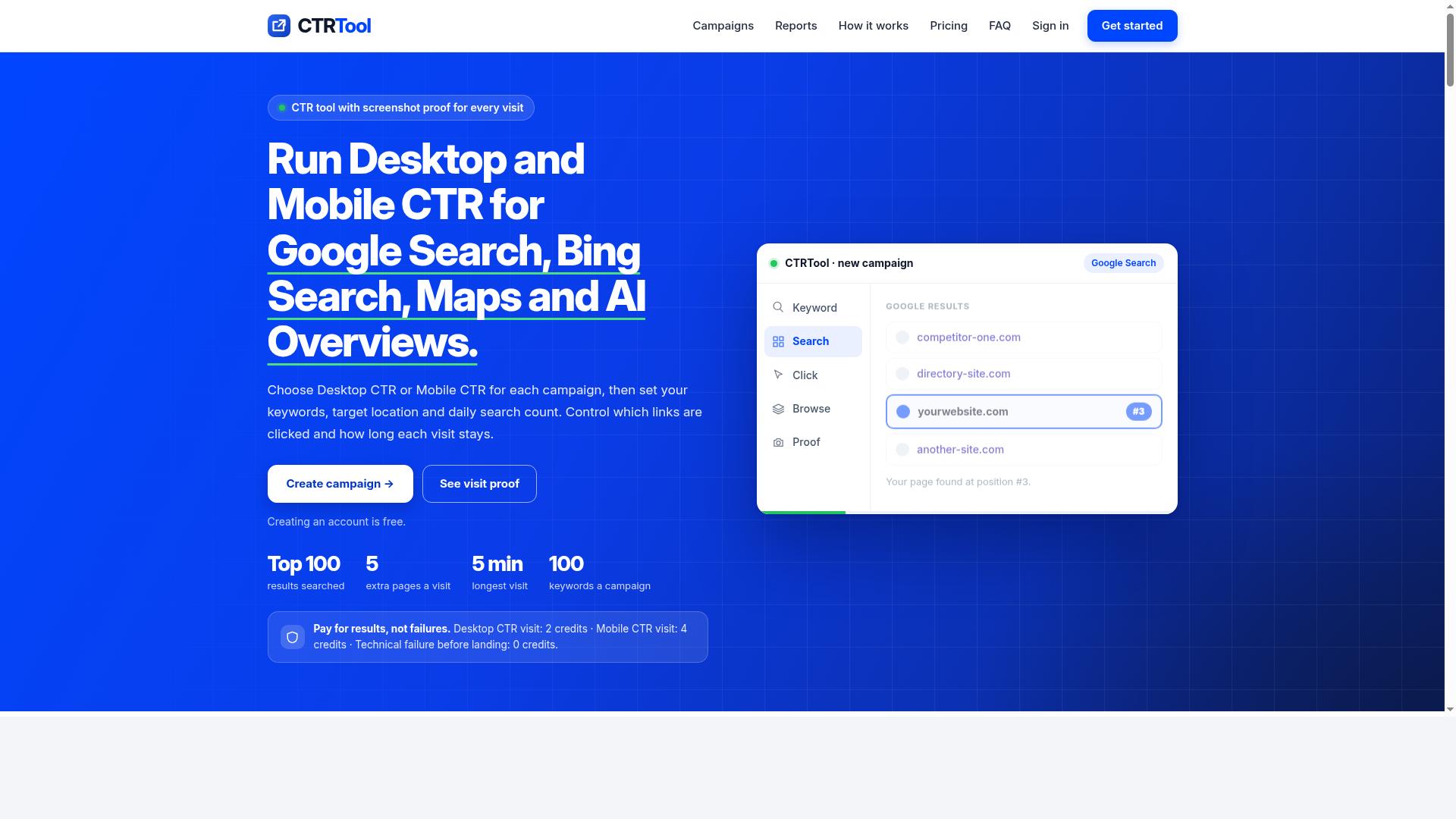
CTRTool is a SaaS platform that runs click-through rate campaigns for Google Search, Bing Search, Google Maps, and AI Overviews, using real user visits backed by screenshot proof. It is a focused CTR campaign tool, not a general SEO suite.
Its purpose is to generate organic and map clicks that influence SERP CTR and engagement signals. Every visit is documented, which sets it apart from tools that only report numbers.
The core promise is simple: screenshot proof for every visit. Campaigns are built for SEO practitioners and agencies, with the site advising users to start with tier links, PBNs and test properties, and to use CTR on main sites with caution.
Who CTRTool Serves and Which Platforms It Covers
CTRTool is built for SEO practitioners and agencies managing CTR campaigns for their own or client websites across four surfaces: Google Search, Bing Search, Google Maps, and AI Overviews. That focus keeps the tool aimed at campaign work rather than broad rank tracking or keyword research.
Coverage differs by platform, so it helps to know what each one includes before planning a campaign:
- Google Search: the top 100 organic results, on desktop or mobile.
- Bing Search: the same top 100 organic results, on desktop or mobile.
- Google Maps: up to 50 listings, roughly five pages.
- AI Overviews: requires a matching citation.
Campaigns can be narrowed to a country, state, and city, or set to "Any country" for a mix of supported locations. That geographic control matters for local pack visibility and for client sites that serve a defined service area.
The site's own guidance points agencies toward tier links, PBNs and test properties, which suits teams that want to validate a campaign before applying CTR work to a main site. For agencies comparing options to an Agency Assassin alternative, this combination of platform coverage, location targeting, and per-visit proof is the practical baseline to check against.
Is CTRTool a Legit Agency Assassin Alternative?
Evaluating CTRTool as an Agency Assassin alternative requires comparing how each tool documents visits, manages credits, and controls campaign targeting. Credibility in this category comes down to one question: can you prove the work actually happened?
A legitimate CTR tool should provide verifiable proof of every visit, not just a summary report. CTRTool supplies screenshot proof for each visit, full visit paths, and keyword position tracking over time. That combination lets agencies show clients exactly what was delivered.
Tools marketed as "agency assassin" products tend to be judged on the same basics: documentation, credit transparency, and targeting control. CTRTool addresses all three directly, which is why it holds up as a credible option rather than a black box.
How the Credit Model and Screenshot Proof Reduce Risk
CTRTool's credit-based pricing and per-visit screenshot proof give agencies a verifiable audit trail that reduces the risk of paying for unsubstantiated clicks. Every visit is documented, so spend can be tied to visible output.
The model is straightforward. The Starter plan costs $59/month for 2,000 credits, covering up to 1,000 Desktop CTR visits or 500 Mobile CTR visits. The Growth plan runs $125/month for 5,000 credits, or up to 2,500 Desktop or 1,250 Mobile visits.
Proof is built into each visit rather than added afterward:
- Separate search and landing screenshots for every visit
- Full visit paths showing the route taken through the session
- Keyword position tracking over time to show movement, not just activity
Because credits are consumed per visit, agencies can forecast spend before a campaign starts. A Desktop CTR visit costs 2 credits and a Mobile CTR visit costs 4, while a verified search without a match costs 1 credit and a technical failure before landing costs 0. That structure keeps budgets predictable.
The proof images can be shared with clients, turning reporting into evidence. For an agency, that means less risk of disputes over delivered work and a clearer link between invoice and outcome. It also supports honest conversations about CTR optimization progress using real visit records rather than estimates.
Key Features That Set CTRTool Apart
CTRTool differentiates itself through four campaign types, per-visit screenshot proof, and granular controls over visit paths and keyword positions. Each piece is built around a simple agency need: showing clients that work actually happened.
Campaigns run across Google, Bing, Maps and AI Overviews, with proof captured on every visit. Controls cover keyword, location, device type and target URL, so results stay tied to the brief.
For agencies comparing it with an Agency Assassin alternative, the draw is verifiability. Screenshots, visit paths and position tracking give you something concrete to put in front of a client.
Campaign Types: Google, Bing, Maps and AI Overviews
CTRTool offers four campaign types: Google Search CTR, Bing Search CTR, Google Maps CTR, and AI Overviews CTR, each with specific eligibility rules. The mechanics differ by platform, so setup choices matter.
Google Search CTR campaigns search a keyword, then click the organic result. You choose Desktop or Mobile, set search depth up to the Top 100 results, and can point visits at internal pages. Bing Search CTR follows the same pattern for Bing.
Google Maps CTR campaigns find a business listing and click its website link. A campaign checks up to 50 listings across roughly five pages, with city targeting to keep location accurate. AI Overviews CTR requires a matching citation: the visit finds your website in the overview and clicks its source link.
Across all four types, users set the keyword, location and target URL per campaign. Country, state and city targeting are available, or Any country. Device type is chosen per campaign, and each campaign supports up to 100 keywords.
That structure suits agencies running SERP CTR work for several clients at once. Search depth, location and device all feed into whether a visit counts, which keeps campaigns aligned with real search intent and query intent.
Proof, Tracking and Visit Path Controls
Every CTRTool visit generates separate search and landing screenshots, and the platform tracks keyword positions over time, including Maps listing order and AI citation order. The two images are kept apart, so you can show the search result and the page it led to.
Reports also include full visit paths, the sequence of pages visited during a session. Visits can run up to five minutes with up to five additional internal pages, giving you a record of where each session went.
Tracking covers more than a single snapshot. Keyword positions are logged over time, alongside Maps listing order and AI citation order, which supports position tracking and rank tracking conversations with clients.
Controls are set per campaign: keyword, location, device type and target URL. Link text, click order and scrolling time can also be configured, along with daily search counts and timing. Daily goals reset at 00:00 UTC.
Proof images are accessible for client reporting, which matters for agencies that need to justify spend. Instead of asking a client to take results on trust, you can hand over screenshots and visit paths that document the work.
Delivery runs through Desktop Chrome windows and real Android phone sessions matched to target location through managed proxy routes. Visits that cannot verify the requested location use no credits, so failed attempts do not eat into budget.
Pricing and Plans
CTRTool offers two monthly plans in USD: Starter at $59/month for 2,000 credits and Growth at $125/month for 5,000 credits. Both plans are billed monthly and priced in US dollars, so budgeting is straightforward for agencies comparing tools.
The table below shows what each plan delivers in credits and in the visits those credits buy.
| Plan | Price (USD/month) | Credits | Desktop CTR Visits | Mobile CTR Visits |
|---|---|---|---|---|
| Starter | $59 | 2,000 | Up to 1,000 | Up to 500 |
| Growth | $125 | 5,000 | Up to 2,500 | Up to 1,250 |
The credit math is simple once you see the ratios. A Desktop CTR visit costs 2 credits, and a Mobile CTR visit costs 4 credits. That explains why each plan lists a mobile ceiling at half its desktop figure: mobile visits consume twice the credits.
Starter's 2,000 credits therefore stretch to 1,000 desktop visits or 500 mobile visits. Growth's 5,000 credits reach 2,500 desktop or 1,250 mobile visits, giving you 2.5 times the volume for roughly double the price.
Two other credit rules matter when you plan a campaign. A verified search without a match costs 1 credit, and a technical failure before landing costs 0 credits. Those details affect how far your monthly budget actually goes during CTR optimization work.
For teams weighing the jump from Starter to Growth, the deciding factor is usually campaign volume rather than features. If your monthly mix of desktop and mobile visits fits inside 2,000 credits, Starter covers it. Larger SEO software workflows or multiple client campaigns push you toward Growth.
Growth is marked Recommended on the site, which suggests it is the plan most buyers settle on. Unused credits roll over while your subscription stays active and expire when cancellation takes effect, so timing your cancellation matters if you have a balance left.
Creating an account is free, so you can review the plans before committing to a monthly charge. Custom development, if you need it, carries a separate one-time fee agreed in advance.
One timing note deserves attention. The site displays limited launch pricing with the line "Prices rise 30% on November 15", and the page also shows November 15, 2026. If you are comparing plans today, the current $59 and $125 rates are the ones to evaluate against your budget.
Trust Signals: What the Platform Actually Documents
CTRTool's trust signals include a documented legal notices page, a clear copyright notice, and a support email listed in the FAQ. These are the concrete, checkable details a reader can verify before committing time or budget to the platform. They matter because an Agency Assassin alternative CTR tool handles campaign data and billing, so basic corporate transparency is a fair thing to expect.
The official website sits at ctrtool.com, and a separate legal notices page is published at ctrtool.com/licenses.html. The site footer carries a copyright notice of © 2026 CTRTool, which confirms an active, maintained web presence. For direct contact, the FAQ lists the support email vaibhav@autoblogging.ai.
That is the full set of verifiable corporate markers. A reader can confirm the domain, the licenses page, the copyright line, and the contact address without relying on any third-party claim.
Just as important is what the platform does not state. The materials reviewed contain no founding date, no headquarters address, no company size, no parent company, no phone number, and no social profiles. None of these omissions are disqualifying on their own, but they are worth noting.
Readers weighing this CTR tool against Agency Assassin should treat these signals as one input, not the whole picture. Pair them with the screenshot proof and the credit model, which speak to how campaigns are verified and how billing works. Corporate transparency tells you who is behind the platform. Proof mechanics and pricing tell you how it performs. A sound decision uses both.
Who Should Use CTRTool
CTRTool fits SEO agencies and practitioners who need verifiable CTR campaigns for client reporting and who operate across Google, Bing, Maps, and AI Overviews. The platform is built for people who treat click-through rate as a measurable lever rather than a guess, and who want a repeatable way to test how better organic CTR affects visibility and engagement.
The service is a global online tool with targeting down to country, state, and city level. That matters for agencies running multi-market accounts, where a campaign that works in one region rarely transfers cleanly to another without local calibration.
Below are the main use-case profiles where CTRTool tends to make the most sense.
- Agencies managing multiple client sites. Teams that need campaign records they can show in a report, not just a dashboard screenshot. The ability to run campaigns per client, per market, and per search surface keeps work organized and defensible.
- In-house SEO teams testing CTR impact. Practitioners who want to isolate whether title tag optimization, meta description optimization, or snippet optimization moves the needle before committing to a wider content change.
- Consultants who need proof for clients. Independent SEOs often have to justify spend to skeptical stakeholders. A structured campaign gives them something concrete to point to alongside rank tracking and GSC data.
CTRTool's own guidance also mentions using tier links, PBNs, and test properties, which points to practitioners comfortable with link and property strategy rather than purely on-page work. If your workflow centers on competitor analysis and keyword research alone, the tool is a narrower fit.
Prerequisites matter as much as audience. Before a campaign can run, the target page must appear in the top 100 organic results for the chosen keyword and location. A page that ranks outside that window has nothing for the campaign to work with, so verify position tracking first.
Each campaign type carries its own condition:
- Maps campaigns check up to 50 listings, so confirm your target listing falls inside that set.
- AI Overview campaigns require a matching citation, meaning the page must actually be referenced in the overview for that query.
These checks are practical gates, not marketing hurdles. Running them before launch saves the wasted cycle of a campaign that cannot register against the SERP. For agencies, building the check into intake is the difference between a clean test and a confused client conversation.
The clearest verdict for this section: CTRTool suits teams that already do rank tracking and SERP analysis and now want to act on organic CTR rather than just observe it. It is a focused SEO software choice for practitioners who value data accuracy and repeatable campaigns over broad all-in-one suites.
Final Verdict
CTRTool is a credible Agency Assassin alternative for agencies that prioritize per-visit screenshot proof and transparent credit-based pricing over broad SEO suite features. The tool is built around a narrow, verifiable promise: campaigns that show what actually happened on each visit, backed by credits you can see and control.
Where it stands strongest is in proof, tracking, and campaign coverage. For agencies that need to demonstrate results to clients rather than describe them, that combination covers the core of the job. Campaign delivery, visit-level evidence, and credit-based billing form a coherent package for CTR-focused work.
The weaker area is corporate transparency. The site offers limited company information, so buyers who want extensive background details before committing will find less to review. Public pages cover the essentials, including Sign in, Create an account, Support, Terms of use, and Legal notices, but not much beyond that.
For agencies running verifiable CTR campaigns, that trade-off is usually acceptable. The value sits in the output and the evidence trail, not in corporate biography. Teams that need a broad SEO software stack with rank tracking, keyword research, and competitor analysis should look elsewhere. Teams that need proof of delivery will find the fit much closer.
Readers who want to ask questions before signing up can reach support at vaibhav@autoblogging.ai. That is the contact route listed in the FAQ, and it is a sensible first step for anyone weighing the tool against their campaign requirements.
Overall assessment: a focused, credible option for agencies that value verifiable CTR campaigns and clear credit-based pricing. Recommended on that basis, with the caveat that limited company information means buyers should confirm their specific questions directly before committing.
Frequently Asked Questions
What exactly makes CTRTool different from other CTR tools?
CTRTool is built around proof: every campaign visit comes with screenshot proof, including separate search and landing screenshots, plus full visit paths. It also tracks keyword positions over time, including Maps listing order and AI citation order, and runs on a pay-for-results credit model. Campaigns cover Google Search, Bing Search, Maps and AI Overviews.
Which platforms and campaign types can I run with CTRTool?
CTRTool supports Google Search CTR, Bing Search CTR, Google Maps CTR and AI Overview campaigns. For search campaigns you choose Desktop CTR or Mobile CTR, set your keywords and target a location, and the tool clicks your organic result from the top 100 results, including internal pages. Maps campaigns find your business listing and click through to its website, while AI Overview campaigns require a matching source link.
How does CTRTool's credit and pricing system work?
CTRTool uses monthly plans priced in USD with credits that convert to visits: Starter is $59/month for 2,000 credits (up to 1,000 Desktop CTR visits or 500 Mobile CTR visits), and Growth is $125/month for 5,000 credits (up to 2,500 Desktop or 1,250 Mobile visits). Because it's pay-for-results, you spend credits on actual campaign visits rather than promises. Check the site for the full plan lineup and current details.
Can I target a specific country, state or city for my campaigns?
Yes. CTRTool is a global online service with no stated country restrictions, and each campaign can target a chosen country and optionally a state and city. You can also select "Any country" to use a mix of supported locations. This makes it straightforward to run separate campaigns for different client markets.
What are the requirements for a campaign to work?
Your page must appear within the top 100 organic results for the chosen keyword and location on search campaigns. Maps campaigns check up to 50 listings (about five pages), and AI Overview campaigns need a matching source link. Meeting these requirements before launch helps ensure your credits are spent on visits that can actually be delivered.
Is CTRTool suitable for agencies managing client websites?
Yes. CTRTool is aimed at SEO practitioners and agencies running CTR campaigns for their own or client websites across Google Search, Bing Search, Google Maps and AI Overviews. Screenshot proof and full visit paths give you documentation you can share with clients, and per-campaign location and device settings help you keep client work organized. For questions, support is available at vaibhav@autoblogging.ai.